Free Robots.txt Generator
Build a correct robots.txt file in seconds: choose what crawlers can access, add your sitemap, and optionally block AI training bots. Copy the result or download the file.
What is robots.txt? It's a plain text file at your site's root (yourdomain.com/robots.txt) that tells crawlers which URLs they may crawl. It manages crawl traffic — it does not hide pages from Google. To keep a page out of search results, use a noindex meta tag instead.
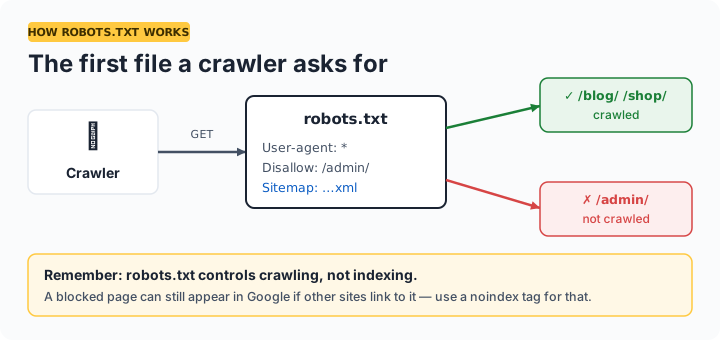
How to use your robots.txt file
Generate the file above, then upload it to the root directory of your website so it loads at https://yourdomain.com/robots.txt. The filename must be lowercase. After uploading, open Google Search Console → Settings → robots.txt to confirm Google reads it correctly. Changes take effect the next time crawlers visit — usually within a day.
Which AI crawlers can you block?
| User-agent | Operator | Used for |
|---|---|---|
| GPTBot | OpenAI | Training data collection |
| ClaudeBot | Anthropic | Training data collection |
| Google-Extended | Gemini AI training (does not affect Google Search ranking) | |
| CCBot | Common Crawl | Open web archive used in many AI datasets |
| PerplexityBot | Perplexity | AI answer engine indexing |
Note: blocking AI crawlers is a trade-off. It keeps your content out of training data, but it may also reduce your visibility in AI answer engines — a growing source of referral traffic. Blocking Google-Extended does not affect your normal Google Search rankings.
Frequently asked questions
What is a robots.txt file?
A plain text file at your site root that tells crawlers which URLs they may crawl. It manages crawl traffic and crawl budget — it is not a security mechanism and does not reliably hide pages.
Where do I upload my robots.txt file?
To your domain's root directory so it's reachable at https://yourdomain.com/robots.txt, named exactly robots.txt in lowercase. Subdirectory locations are ignored.
Does robots.txt block a page from appearing in Google?
Not reliably. A disallowed page can still be indexed if other sites link to it. Use a noindex meta tag on a crawlable page, or password protection, to keep pages out of results.
How do I block AI crawlers like GPTBot?
Add a user-agent group per crawler with Disallow: /. Tick the AI-blocking checkbox above and the generator adds GPTBot, ClaudeBot, Google-Extended, CCBot, and PerplexityBot automatically.
Should I include my sitemap in robots.txt?
Yes — a Sitemap: line helps every search engine discover your pages faster. You can include multiple sitemap lines.
Can a wrong robots.txt hurt my SEO?
Yes. A mistaken Disallow: / under User-agent: * blocks your whole site from crawling and can remove it from search over time. Test in Google Search Console after uploading.